
How to Analyze WordPress Error Logs?
WordPress Error Log Reading, Analysis, and Troubleshooting Guide.
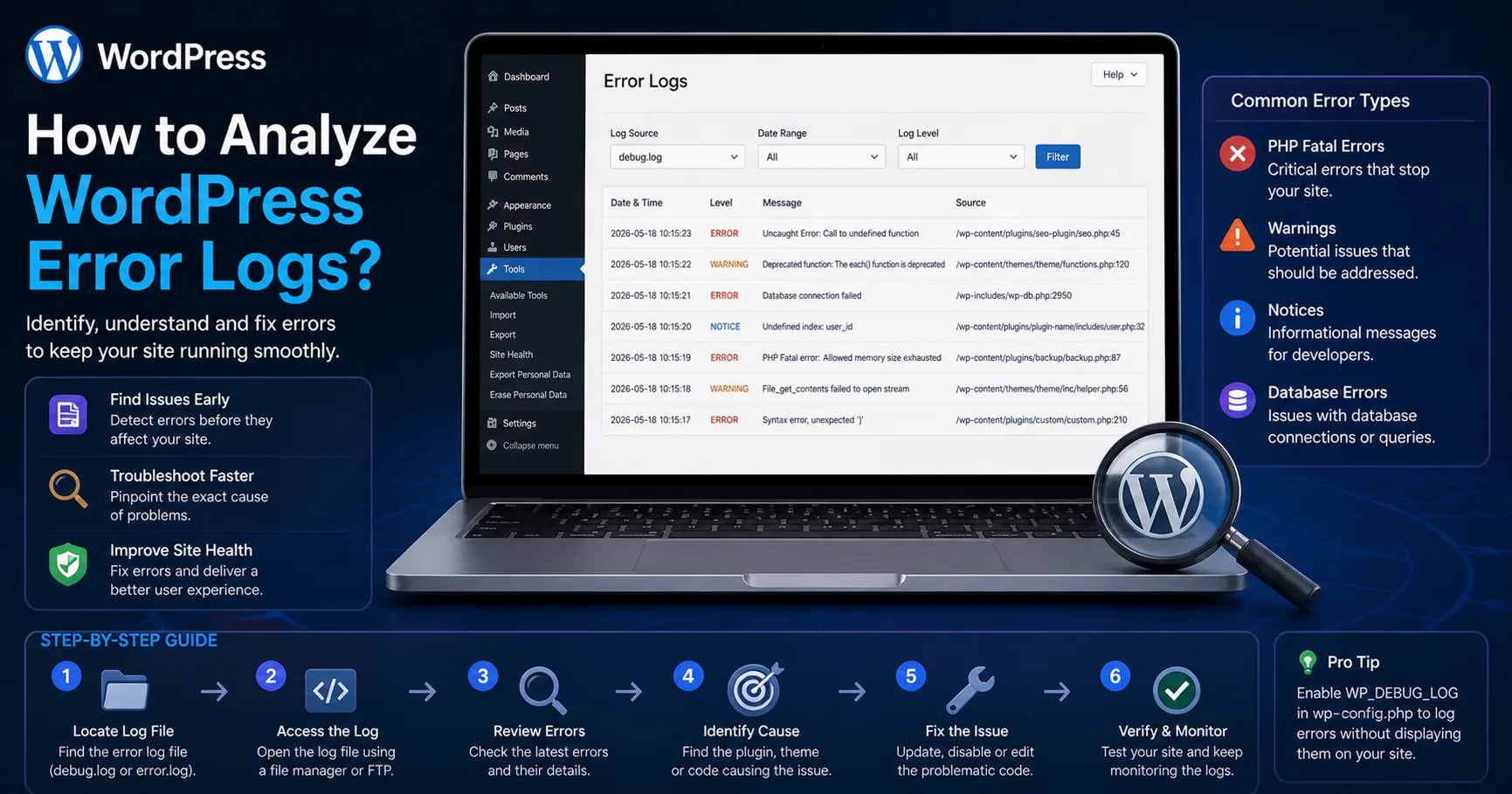
Most WordPress issues can be quickly diagnosed and resolved by properly analyzing error logs. In this comprehensive guide, you’ll learn how WordPress error log analysis works, what different errors mean, and how to fix them using professional techniques.
What Is a WordPress Error Log?
An error log is a file where PHP errors, warnings, and critical issues occurring on your WordPress site are recorded.
Common error types include:
PHP Fatal Errors
PHP Warnings
PHP Notices
Deprecated warnings
Database errors
These logs are the foundation of debugging because they point directly to the source of problems.How to Enable WordPress Error Logs
Before analyzing logs, you must enable logging in WordPress.
wp-config.php Settings
Add the following lines to your wp-config.php file:define('WP_DEBUG', true);
define('WP_DEBUG_LOG', true);
define('WP_DEBUG_DISPLAY', false);This configuration:
Logs errors into a file
Prevents displaying errors to visitors (important for SEO & security)
Log file location:
/wp-content/debug.logWhere to Find Error Logs
Depending on your environment, logs may be located in different places:
On Hosting (cPanel)
File Manager → /public_html/wp-content/debug.log
Via SSH
tail -f /home/username/public_html/wp-content/debug.logServer Logs (Apache / Nginx)
/var/log/apache2/error.log/var/log/nginx/error.logTypes of WordPress Errors Explained
1. Fatal Error (Critical)
These errors crash your site.
Example:
PHP Fatal error: Call to undefined function
Common causes:
Missing functions
Incorrect includes
Plugin conflicts
2. Warning
The site still works but has issues.
Example:
PHP Warning: Undefined variable
3. Notice
Related to code quality and best practices.
Example:
PHP Notice: Undefined index
4. Database Error
WordPress database error: Table doesn't exist
How to Analyze WordPress Error Logs (Step-by-Step)
1. Identify Error Patterns
Check if the same error repeats frequently.
2. Locate File and Line Number
Logs usually include:
/path/to/file.php on line 45This tells you exactly where the issue is.
3. Analyze Stack Trace
Review the function call chain to understand the root cause.4. Isolate Plugin or Theme
Disable all plugins
Enable them one by one
Identify the source of the issue
Most Common WordPress Error Log Issues
White Screen of Death (WSOD)
Usually caused by Fatal Errors
500 Internal Server Error
Often related to .htaccess or server configuration
Memory Limit Error
Allowed memory size exhausted
Plugin Conflicts
Multiple plugins using the same hooks
Advanced Log Analysis Techniques
Filter with grep
grep "Fatal error" debug.logView last entries
tail -n 100 debug.logReal-time monitoring
tail -f debug.logAI-Powered WordPress Log Analysis
Manual log analysis can be time-consuming. AI-based tools can automate and simplify the process.
👉 Recommended professional solution:
Eka Yazılım WordPress plugin:
👉 https://www.ekasunucu.com/yazilim/eka-ai-log-explainer-wordpress-yapay-zeka-destekli-hata-log-analiz-eklentisi
Features:
Automatic log analysis
Error classification
Smart solution suggestions
User-friendly explanations
Why Error Log Analysis Matters for SEO
A site with errors can:
Lose rankings due to crawl issues
Experience indexing problems
Suffer from poor Core Web VitalsCritical issues like:
500 errors
Timeouts
Database delays
Directly impact SEO performance.
Professional Debugging Workflow
Enable logging
Categorize errors
Prioritize critical issues
Fix in staging environment
Deploy to production
Conclusion
WordPress error log analysis is essential not only for fixing issues but also for improving performance and SEO.
With the right techniques and tools, you can quickly resolve even complex problems and maintain a stable, high-performing website.
Frequently Asked Questions (FAQ)
Are error logs harmful?
No, they are safe when properly configured.
Do logs grow over time?
Yes, they should be cleaned periodically.
Do logs affect SEO?
Indirectly yes, because errors impact performance and crawlability.With this guide, you now have a professional-level understanding of WordPress error log analysis.